Guides · Records
Bring a medication history your vet can actually read
A useful export makes the entries easy to find—and the gaps easy to explain. Bring the recorded history, your current medication instructions and a short list of questions for the appointment.
Helen, Robert and their cat Felix are fictional characters. The downloadable examples use six invented entries and “Medication A” as a placeholder. Dates, times and statuses demonstrate the format; they are not a treatment plan.

Start with the question for this visit
In this example, Helen wants to discuss the entries from October 20–22. One is marked skipped, but its note does not explain why. She wants to bring that gap to the conversation, rather than turn it into an explanation the record never contained.
She keeps the original export and writes a separate visit note: “October 21, 18:00: marked skipped by Robert; no reason recorded. Ask Robert what he remembers before the appointment. If still unknown, say so.” That note is context for the visit, not a new fact inserted into the log.
Two formats, the same recorded entries
These files were generated with DoseHandoff’s actual CSV and PDF export functions using the same demo records. The table has not been redesigned for this article. This is a reproducible format example, not a customer history or a capture of the iPhone share sheet. The sample includes a source link added for the next app update; the current App Store version may not show that footer yet. The export columns are unchanged.
CSV: work with a copy
Open the rows in a spreadsheet to sort or filter. CSV export is available on Free and Plus.
Download the sample CSVPDF: read, print or send
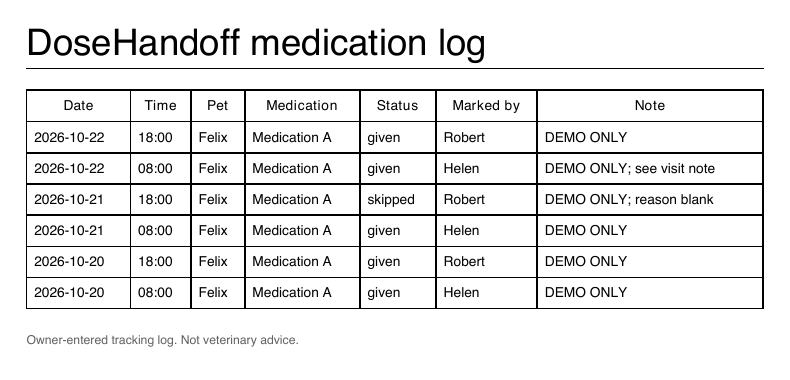
The Plus report puts the same seven fields into a simple table. It does not add a clinical interpretation.
Open the actual sample PDFOpens in a new tab. Demo data only.
Read the columns before explaining the entries
The CSV and PDF use the same fields. Here are the six rows as exported, newest scheduled entry first.
| Date | Time | Pet | Medication | Status | Marked by | Note |
|---|---|---|---|---|---|---|
| 2026-10-22 | 18:00 | Felix | Medication A | given | Robert | DEMO ONLY |
| 2026-10-22 | 08:00 | Felix | Medication A | given | Helen | DEMO ONLY; see visit note |
| 2026-10-21 | 18:00 | Felix | Medication A | skipped | Robert | DEMO ONLY; reason blank |
| 2026-10-21 | 08:00 | Felix | Medication A | given | Helen | DEMO ONLY |
| 2026-10-20 | 18:00 | Felix | Medication A | given | Robert | DEMO ONLY |
| 2026-10-20 | 08:00 | Felix | Medication A | given | Helen | DEMO ONLY |
Date and Time: the scheduled local date and time slot. In the row for October 22 at 08:00, 08:00 is the planned slot—not the time someone tapped the button. The export does not include a recording timestamp or a time-zone column.
Pet and Medication: the names saved with the entry. “Medication A” is our demo placeholder. These columns do not provide strength, dose amount or directions.
Status: the saved status, such as given or skipped. The skipped row does not explain its reason on its own.
Marked by and Note: the recorded display name and note text. A blank or incomplete note stays incomplete; do not fill it with a guess.
The export contains recorded events, not a complete list of every expected dose. A missing row does not establish that a medication was missed. The file is an owner-entered tracking log, not independent proof of administration.
View the raw CSV
Date,Time,Pet,Medication,Status,Marked by,Note
2026-10-22,18:00,Felix,Medication A,given,Robert,DEMO ONLY
2026-10-22,08:00,Felix,Medication A,given,Helen,DEMO ONLY; see visit note
2026-10-21,18:00,Felix,Medication A,skipped,Robert,DEMO ONLY; reason blank
2026-10-21,08:00,Felix,Medication A,given,Helen,DEMO ONLY
2026-10-20,18:00,Felix,Medication A,given,Robert,DEMO ONLY
2026-10-20,08:00,Felix,Medication A,given,Helen,DEMO ONLY
Export from the app, then check the file
- On your iPhone, open Settings → Data & privacy → Export data.
- Choose Export your data for CSV, or Vet report (PDF) if the household has Plus.
- Use the iPhone share sheet to save the file or share it through the channel you choose. Generating it does not send it to your clinic automatically.
- Open the saved file. Check the pets, medication names and dates it actually contains before you print or send it.
The current export collects the household’s recorded events; it does not offer a pet or date-range selector. It is also separate from the History screen’s 14-day Free viewing limit: the CSV export is not capped to that view.
If you need one pet or a shorter period, keep the original and filter a copy of the CSV. Label the copy with the selected pet and dates, and make clear that rows were omitted. Review the full file for other pets’ information before sending it.
Add the context the export cannot supply
For Helen’s example, the appointment packet is small:
- The original log, plus a clearly labelled filtered copy if needed.
- The current medication list and written instructions. The history table does not replace the current prescription, strength or dose directions.
- A separate visit note identifying the unexplained skipped entry and the question Helen wants to ask. Keep recollections and questions distinct from the original entries.
- The date range and local time-zone context. Here the demo entries use Portland local time; that context is not printed as an export field.
Ask your clinic which format and delivery method it accepts. Confirm that the file opens, the relevant dates are present and your separate note is included. The point is to make your records understandable—not to turn a tracking table into a diagnosis or treatment decision.